Company Default Filters
Every filtered list in SDA opens with a set of default filters. Users can save their own defaults, and administrators can save a company default that applies to the whole company — so a new colleague's device list is already scoped the way your team works, without anyone configuring anything.
A company default is set from the list itself, not from this page. There is no central screen listing them: you set the default where you use the filter.
Requirements
Setting or removing a company default requires permission to update the company. Users without it can still save personal defaults for themselves; they never see the company option.
Setting a company default
- Go to the list you want to change — for example Devices.
- Open a filter above the table and select the values that should be the company-wide default.
- Click Save, then Set current as company default.
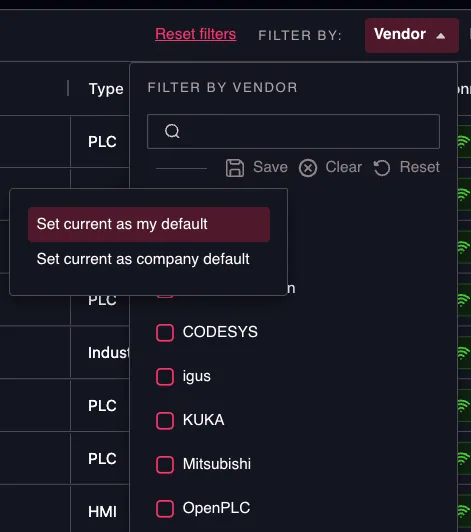
Company defaults are set from the filter itself,
on the list they apply to.
The change takes effect for every user in the company the next time they open that list.
How it interacts with personal defaults
SDA resolves each filter in this order: personal default → company default → platform baseline.
A company default does not overwrite personal defaults. Colleagues who already saved their own default for that filter keep it, and will not see your change until they remove their personal default. Mention this when you roll out a company default that everyone is expected to see.
Removing a company default
Open the same filter. The bottom of the filter shows Using company default filter; Remove deletes it and returns the filter to the platform baseline. Where you also have a personal default on that filter, Remove asks which of the two to delete.
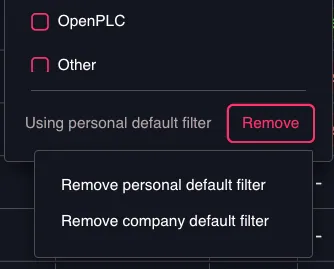
With both layers set, choose which
default to remove.
Limits
- Company defaults cover the dropdown filters above a list. Search text, sorting, time ranges and rows per page are not stored.
- The group, tag and owner filters cannot have a company default. Their options are permission-scoped, so one company-wide value would resolve differently for each user. Personal defaults on those filters work as normal.
Full behaviour, including personal defaults: Filters & Default Filters.