Role Based Access Control (RBAC)
Overview
This document describes the available permissions within the Role-Based Access Control (RBAC) system. Each service provides specific actions that can be granted to users through role assignments.
Permission Scope
Permissions can be granted at different scopes:
- Resource-specific: Access to individual, specifically identified resources
- All resources: Access to all resources of a type across the entire system
- Group-based: Access to resources within specific organisational groups
- If a user has access to a group, this also includes all subgroups
- Tag-based: Access to resources with a given tag
Each policy in a role can use its own scope. When several policies should target the same thing — everything in one group, everything carrying one tag, or simply everything — set it once for the whole role instead. See Common resource scope.
Tag-level permissions require users to have read access to the selected tags; otherwise, the permission system won't function as expected.
Getting Started
To assign permissions to users:
- Create a user role, select an existing one, or duplicate one to start from its policies
- Define policies using the policy editor
For the policy editor we support two ways for the user to define the desired policy:
- Policy creation wizard
- Policy creation via JSON
Contact your system administrator for assistance with role assignments and permission management.
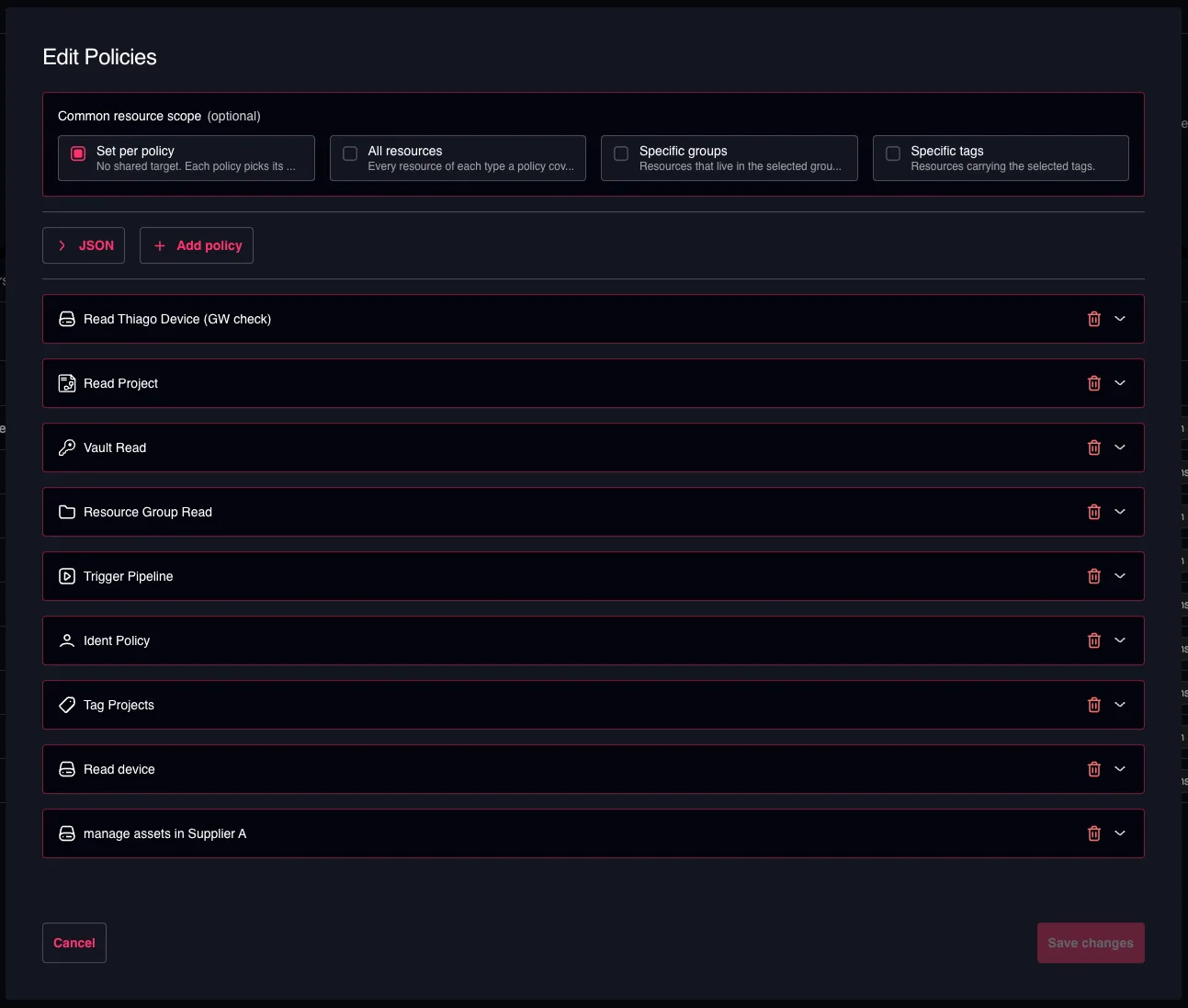
Policy Creation Wizard
The wizard builds one policy per resource type. For each policy you choose the actions it grants and the resources it applies to.
Above the policy list sits Common resource scope — the target shared by the whole role. Set it first: every policy that can use it then follows it automatically, and each policy can still be detached individually to pick its own resources. See Common resource scope.
Policy Creation via JSON
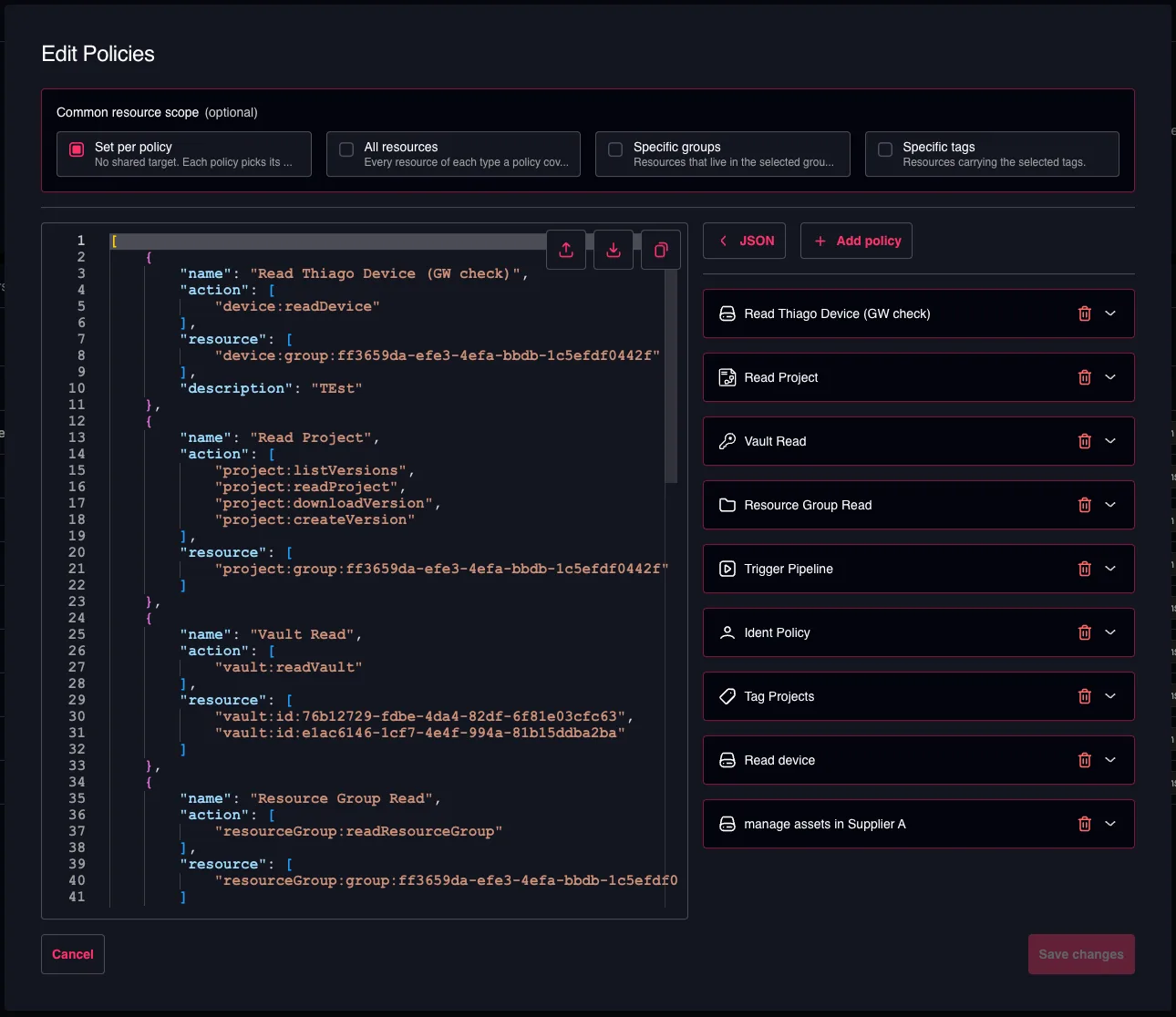
To switch to the JSON editor, click the JSON button above the policy list.
JSON Format
The JSON format is structured like this:
[
    {
        "name": "Project Policy",
        "action": [
            "project:createVersion",
            "project:readProject",
            "project:updateProject",
            "project:updateVersion"
        ],
        "resource": [
            "project:group:95d140cc-c391-4e25-ac92-abf57bb9a415"
        ]
    },
    {
        "name": "Device Policy",
        "action": [
            "device:readDevice",
            "device:createDevice",
            "device:updateDevice"
        ],
        "resource": [
            "device:id:290133f7-79c2-40ce-bdc2-48a73dd8691c",
            "device:id:9a2642b9-8101-4527-81b8-d74f21ccb650"
        ]
    },
    {
        "name": "Gateway Policy",
        "action": [
            "gateway:createGateway",
            "gateway:readGateway",
            "gateway:updateGateway"
        ],
        "resource": [
            "gateway:*"
        ]
    }
]
It is defined as an array of policies, where each policy contains the following properties:
- name: Unique name of the policy
- description: Optional meaningful description of the policy
- action: A list of allowed actions for the given policy
- See #available-actions for the list of available actions
- resource: A list of resource identifications
- All resources of a given type:
gateway:* - Specific resources by IDs:
gateway:id:<GATEWAY_ID> - All resources of a given type in a group (or any subgroup):
gateway:group:<GROUP_ID> - All resources of a given type with a specific tag:
gateway:tag:<TAG>
- All resources of a given type:
The common resource scope is not a field in this format. It is a shortcut in the wizard that writes the same resource values shown above — project:group:<ID>, device:tag:<TAG>, gateway:* — so the policies are always the source of truth. When a role is reopened, the scope displayed is read back from the resources its policies share.
Predefined User Roles
Admin User Role
[
    {
        "name": "Admin User Role Policy",
        "action": [
            "*"
        ],
        "resource": [
            "*"
        ]
    }
]
Engineer User Role
[
    {
        "name": "Device Policy",
        "action": [
            "device:backup",
            "device:connect",
            "device:createDevice",
            "device:snapshot",
            "device:deleteDevice",
            "device:deploy",
            "device:linkDevice",
            "device:readDevice",
            "device:readVariableList",
            "device:setPassword",
            "device:unlinkDevice",
            "device:updateDevice",
            "device:writeVariableList"
        ],
        "resource": [
            "device:*"
        ]
    },
    {
        "name": "Document Policy",
        "action": [
            "document:createDocument",
            "document:createVersion",
            "document:deleteDocument",
            "document:deleteVersion",
            "document:downloadVersion",
            "document:linkDevice",
            "document:linkGateway",
            "document:linkProject",
            "document:listVersions",
            "document:readDocument",
            "document:unlinkDevice",
            "document:unlinkGateway",
            "document:unlinkProject",
            "document:updateDocument",
            "document:updateVersion"
        ],
        "resource": [
            "document:*"
        ]
    },
    {
        "name": "Gateway Policy",
        "action": [
            "gateway:createGateway",
            "gateway:deleteGateway",
            "gateway:readGateway",
            "gateway:updateGateway"
        ],
        "resource": [
            "gateway:*"
        ]
    },
    {
        "name": "Ident Policy",
        "action": [
            "ident:readUser",
            "ident:readUserGroup"
        ],
        "resource": [
            "ident:*"
        ]
    },
    {
        "name": "License Policy",
        "action": [
            "license:createLicense",
            "license:deleteLicense",
            "license:readLicense",
            "license:useLicense"
        ],
        "resource": [
            "license:*"
        ]
    },
    {
        "name": "Pipeline Policy",
        "action": [
            "pipeline:createPipeline",
            "pipeline:deletePipeline",
            "pipeline:listExecutions",
            "pipeline:readPipeline",
            "pipeline:triggerExecution",
            "pipeline:updatePipeline"
        ],
        "resource": [
            "pipeline:*"
        ]
    },
    {
        "name": "Project Policy",
        "action": [
            "project:createProject",
            "project:createVersion",
            "project:deleteProject",
            "project:deleteVersion",
            "project:downloadVersion",
            "project:linkDevice",
            "project:linkProject",
            "project:listVersions",
            "project:lockProject",
            "project:readProject",
            "project:unlinkDevice",
            "project:unlinkProject",
            "project:unlockProject",
            "project:updateProject",
            "project:updateVersion"
        ],
        "resource": [
            "project:*"
        ]
    },
    {
        "name": "Resource Group Policy",
        "action": [
            "resourceGroup:readResourceGroup"
        ],
        "resource": [
            "resourceGroup:*"
        ]
    },
    {
        "name": "Tag Policy",
        "action": [
            "tag:*"
        ],
        "resource": [
            "tag:*"
        ]
    },
    {
        "name": "Vault Policy",
        "action": [
            "vault:createSecret",
            "vault:deleteSecret",
            "vault:linkSecret",
            "vault:listSecrets",
            "vault:readVault",
            "vault:unceilSecret",
            "vault:updateSecret"
        ],
        "resource": [
            "vault:*"
        ]
    }
]
Tech User Role
[
    {
        "name": "Device Policy",
        "action": [
            "device:backup",
            "device:connect",
            "device:snapshot",
            "device:deploy",
            "device:readDevice",
            "device:readVariableList",
            "device:setPassword",
            "device:writeVariableList"
        ],
        "resource": [
            "device:*"
        ]
    },
    {
        "name": "Document Policy",
        "action": [
            "document:createVersion",
            "document:deleteVersion",
            "document:downloadVersion",
            "document:listVersions",
            "document:readDocument",
            "document:updateVersion"
        ],
        "resource": [
            "document:*"
        ]
    },
    {
        "name": "Gateway Policy",
        "action": [
            "gateway:readGateway"
        ],
        "resource": [
            "gateway:*"
        ]
    },
    {
        "name": "Ident Policy",
        "action": [
            "ident:readUser",
            "ident:readUserGroup"
        ],
        "resource": [
            "ident:*"
        ]
    },
    {
        "name": "License Policy",
        "action": [
            "license:useLicense"
        ],
        "resource": [
            "license:*"
        ]
    },
    {
        "name": "Pipeline Policy",
        "action": [
            "pipeline:listExecutions",
            "pipeline:readPipeline",
            "pipeline:triggerExecution"
        ],
        "resource": [
            "pipeline:*"
        ]
    },
    {
        "name": "Project Policy",
        "action": [
            "project:createVersion",
            "project:deleteVersion",
            "project:downloadVersion",
            "project:listVersions",
            "project:lockProject",
            "project:readProject",
            "project:unlockProject",
            "project:updateVersion"
        ],
        "resource": [
            "project:*"
        ]
    },
    {
        "name": "Resource Group Policy",
        "action": [
            "resourceGroup:readResourceGroup"
        ],
        "resource": [
            "resourceGroup:*"
        ]
    },
    {
        "name": "Tag Policy",
        "action": [
            "tag:readTag"
        ],
        "resource": [
            "tag:*"
        ]
    },
    {
        "name": "Vault Policy",
        "action": [
            "vault:listSecrets",
            "vault:readVault",
            "vault:updateSecret"
        ],
        "resource": [
            "vault:*"
        ]
    }
]
Read Only User Role
[
    {
        "name": "Device Policy",
        "action": [
            "device:readDevice",
            "device:readVariableList"
        ],
        "resource": [
            "device:*"
        ]
    },
    {
        "name": "Document Policy",
        "action": [
            "document:listVersions",
            "document:readDocument"
        ],
        "resource": [
            "document:*"
        ]
    },
    {
        "name": "Gateway Policy",
        "action": [
            "gateway:readGateway"
        ],
        "resource": [
            "gateway:*"
        ]
    },
    {
        "name": "Ident Policy",
        "action": [
            "ident:readUser",
            "ident:readUserGroup"
        ],
        "resource": [
            "ident:*"
        ]
    },
    {
        "name": "Pipeline Policy",
        "action": [
            "pipeline:listExecutions"
        ],
        "resource": [
            "pipeline:*"
        ]
    },
    {
        "name": "Project Policy",
        "action": [
            "project:listVersions",
            "project:readProject"
        ],
        "resource": [
            "project:*"
        ]
    },
    {
        "name": "Resource Group Policy",
        "action": [
            "resourceGroup:readResourceGroup"
        ],
        "resource": [
            "resourceGroup:*"
        ]
    },
    {
        "name": "Tag Policy",
        "action": [
            "tag:readTag"
        ],
        "resource": [
            "tag:*"
        ]
    }
]
Available Actions
Audit Log Service
The Audit Log service manages access to audit and logging information.
| Action | Description | Action ID |
|---|---|---|
| All actions | Complete access to all autit log operations | auditLog:* |
| Read audit log | View audit log entries | auditLog:readAuditLog |
Billing Service
The Billing service manages billing information and operations.
| Action | Description | Action ID |
|---|---|---|
| All actions | Complete access to all billing operations | billing:* |
| Read billing | View billing information | billing:getBilling |
| Update billing | Modify billing settings and data | billing:updateBilling |
Device Service
The Device service manages device lifecycle, connections and operations.
| Action | Description | Action ID |
|---|---|---|
| All actions | Complete access to all device operations | device:* |
| Create device | Add new devices to the system | device:createDevice |
| Read device | View device information and status | device:readDevice |
| Update device | Modify device settings and configuration | device:updateDevice |
| Delete device | Remove devices from the system | device:deleteDevice |
| Link gateway | Link gateways with a device | device:linkGateway |
| Unlink gateway | Unlink gateways from a device | device:unlinkGateway |
| Link device | Link devices with a device | device:linkDevice |
| Unlink device | Unlink devices from a device | device:unlinkDevice |
| Connect to device | Establish connections to devices | device:connect |
| Deploy to device | Deploy configurations or software to devices | device:deploy |
| Backup device | Create backups of device configurations | device:backup |
| Create device snapshot | Create point-in-time snapshots of devices | device:snapshot |
| Set device password | Configure device authentication credentials | device:setPassword |
| Read variables list | Read the list of variables of the device | device:readVariableList |
| Write variables list | Write to the list of variables of the device | device:writeVariableList |
Document Service
The Document service manages document creation, versioning and linking to other resources.
| Action | Description | Action ID |
|---|---|---|
| All actions | Complete access to all document operations | document:* |
| Create document | Create new documents | document:createDocument |
| Create document version | Create new versions of existing documents | document:createVersion |
| Read document | View document content and information | document:readDocument |
| List document versions | View all versions of a document | document:listVersions |
| Download document version | Download specific document versions | document:downloadVersion |
| Update document | Modify document content and metadata | document:updateDocument |
| Update document version | Modify existing document versions | document:updateVersion |
| Delete document | Remove documents from the system | document:deleteDocument |
| Delete document version | Remove specific document versions | document:deleteVersion |
| Link project | Associate documents with projects | document:linkProject |
| Link device | Associate documents with devices | document:linkDevice |
| Link gateway | Associate documents with gateways | document:linkGateway |
| Link license | Associate documents with licenses | document:linkLicense |
| Link user | Associate documents with users | document:linkUser |
| Unlink project | Remove document-project associations | document:unlinkProject |
| Unlink device | Remove document-device associations | document:unlinkDevice |
| Unlink gateway | Remove document-gateway associations | document:unlinkGateway |
| Unlink license | Remove document-license associations | document:unlinkLicense |
| Unlink user | Remove document-user associations | document:unlinkUser |
Gateway Service
The Gateway service manages gateway resources and operations.
| Action | Description | Action ID |
|---|---|---|
| All actions | Complete access to all gateway operations | gateway:* |
| Create gateway | Add new gateways to the system | gateway:createGateway |
| Read gateway | View gateway information and status | gateway:readGateway |
| Update gateway | Modify gateway settings and configuration | gateway:updateGateway |
| Delete gateway | Remove gateways from the system | gateway:deleteGateway |
Identity Service
The Identity service manages users, user roles, user groups and tenant information.
| Action | Description | Action ID |
|---|---|---|
| All actions | Complete access to all identity operations | ident:* |
| Create user | Add new users to the system | ident:createUser |
| Read user | View user information and details | ident:readUser |
| Update user | Modify user account information | ident:updateUser |
| Delete user | Remove users from the system | ident:deleteUser |
| Update profile | Modify user profile information | ident:updateProfile |
| Update tenant | Modify tenant settings and configuration | ident:updateTenant |
| Delete tenant | Remove tenants from the system | ident:deleteTenant |
| Create user role | Create new user roles | ident:createUserRole |
| Read user role | View user role information and details | ident:readUserRole |
| Update user role | Modify existing user roles | ident:updateUserRole |
| Delete user role | Remove user roles from the system | ident:deleteUserRole |
| Link user role | Assign roles to users | ident:linkUserRole |
| Unlink user role | Remove role assignments from users | ident:unlinkUserRole |
Integration Service
The Integration service manages integrations, like for GitHub.
| Action | Description | Action ID |
|---|---|---|
| All actions | Complete access to all integration operations | integration:* |
| Create integration | Add new integrations to the system | integration:createIntegration |
| Read integration | View integration information and details | integration:readIntegration |
| Update integration | Modify an existing integration | integration:updateIntegration |
| Delete integration | Remove integrations from the system | integration:deleteIntegration |
| List repositories | View repositories for an existing integration | integration:listRepositories |
| Update repository | Modify repository settings and configuration | integration:updateRepository |
License Service
The License service manages software licenses and their usage.
| Action | Description | Action ID |
|---|---|---|
| All actions | Complete access to all license operations | license:* |
| Create license | Add new licenses to the system | license:createLicense |
| Read license | View license information and status | license:readLicense |
| Delete license | Remove licenses from the system | license:deleteLicense |
| Use license | Activate and utilize licenses | license:useLicense |
| Admin unlock license | Administrative unlock of licenses which are locked by any user | license:adminUnlockLicense |
Pipeline Service
The Pipeline service manages automated workflows and their executions.
| Action | Description | Action ID |
|---|---|---|
| All actions | Complete access to all pipeline operations | pipeline:* |
| Create pipeline | Create new automated pipelines | pipeline:createPipeline |
| Read pipeline | View pipeline information and configuration | pipeline:readPipeline |
| List pipeline executions | View pipeline execution history | pipeline:listExecutions |
| Trigger pipeline execution | Start pipeline executions | pipeline:triggerExecution |
| Update pipeline | Modify pipeline settings and configuration | pipeline:updatePipeline |
| Delete pipeline | Remove pipelines from the system | pipeline:deletePipeline |
| Delete pipeline executions | Remove pipeline execution records | pipeline:deleteExecutions |
Jobs are automatically accessible through pipeline permissions. If you have permission to access a pipeline and list its executions, you can view job status, logs and other details.
Project Service
The Project service manages project lifecycle, versioning and device linking. For project-versions, the permissions are always granted on the parent project.
| Action | Description | Action ID |
|---|---|---|
| All actions | Complete access to all project operations | project:* |
| Create project | Create new projects | project:createProject |
| Create project version | Create new versions for existing projects | project:createVersion |
| Read project | View project information and details | project:readProject |
| List project versions | View all versions of a project | project:listVersions |
| Download project version | Download specific project versions | project:downloadVersion |
| Update project | Modify project settings and information | project:updateProject |
| Update project version | Modify the comment of a project version | project:updateVersion |
| Delete project | Remove projects from the system | project:deleteProject |
| Delete project version | Remove specific project versions from a project | project:deleteVersion |
| Link project | Associate projects (eg. libraries) with other projects (eg. standard projects) | project:linkProject |
| Link device | Connect devices to projects | project:linkDevice |
| Unlink project | Remove project associations (eg. library from standard project) | project:unlinkProject |
| Unlink device | Disconnect devices from projects | project:unlinkDevice |
| Lock project | Lock projects to prevent modifications | project:lockProject |
| Unlock project | Unlock projects which are locked by the own user to allow modifications | project:unlockProject |
| Admin unlock project | Administrative unlock of projects which are locked by any user | project:adminUnlockProject |
Resource Groups Service
The Resource Groups service manages organizational groupings of resources.
| Action | Description | Action ID |
|---|---|---|
| All Actions | Complete access to all resource group operations | resourceGroup:* |
| Create Resource Group | Create new resource groups | resourceGroup:createResourceGroup |
| Read Resource Group | View resource group information | resourceGroup:readResourceGroup |
| Update Resource Group | Modify resource group settings | resourceGroup:updateResourceGroup |
| Delete Resource Group | Remove resource groups from the system | resourceGroup:deleteResourceGroup |
Tag Service
The Tag service manages metadata tags and their associations with various resources.
| Action | Description | Action ID |
|---|---|---|
| All actions | Complete access to all tag operations | tag:* |
| Create tag | Create new metadata tags | tag:createTag |
| Read tag | View tag information and associations | tag:readTag |
| Delete tag | Remove tags from the system | tag:deleteTag |
| Link device | Associate tags with devices | tag:linkDevice |
| Link document | Associate tags with documents | tag:linkDocument |
| Link gateway | Associate tags with gateways | tag:linkGateway |
| Link license | Associate tags with licenses | tag:linkLicense |
| Link project | Associate tags with projects | tag:linkProject |
| Link user | Associate tags with users | tag:linkUser |
| Link vault | Associate tags with vaults | tag:linkVault |
| Link pipeline | Associate tags with pipelines | tag:linkPipeline |
| Unlink device | Remove tag associations from devices | tag:unlinkDevice |
| Unlink document | Remove tag associations from documents | tag:unlinkDocument |
| Unlink gateway | Remove tag associations from gateways | tag:unlinkGateway |
| Unlink license | Remove tag associations from licenses | tag:unlinkLicense |
| Unlink project | Remove tag associations from projects | tag:unlinkProject |
| Unlink user | Remove tag associations from users | tag:unlinkUser |
| Unlink vault | Remove tag associations from vaults | tag:unlinkVault |
| Unlink pipeline | Remove tag associations from pipelines | tag:unlinkPipeline |
Vault Service
The Vault service manages secure storage of secrets and sensitive information.
| Action | Description | Action ID |
|---|---|---|
| All actions | Complete access to all vault operations | vault:* |
| Create vault | Create new secure vaults | vault:createVault |
| Create secret | Add new secrets to vaults | vault:createSecret |
| Read vault | View vault information and metadata | vault:readVault |
| List secrets | View secrets contained in vaults | vault:listSecrets |
| Link secret | Associate secrets with other resources | vault:linkSecret |
| Update vault | Modify vault settings and configuration | vault:updateVault |
| Update secret | Modify existing secrets | vault:updateSecret |
| Delete vault | Remove vaults from the system | vault:deleteVault |
| Delete secret | Remove secrets from vaults | vault:deleteSecret |
| Unceil secret | Reveal and access secret values | vault:unceilSecret |
Webhook Service
The Webhook service manages the configuration, delivery, security and reliability of outbound HTTP notifications triggered by system events, enabling real-time integrations with external systems.
| Action | Description | Action ID |
|---|---|---|
| All actions | Complete access to all webhook operations | webhook:* |
| Create webhook | Create new webhook configurations | webhook:createWebhook |
| Read webhook | View webhook configurations | webhook:readWebhook |
| Update webhook | Modify webhook settings and configuration | webhook:updateWebhook |
| Delete webhook | Remove webhooks from the system | webhook:deleteWebhook |
Webhook Service
The Webhook service manages secure storage of secrets and sensitive information.
| Action | Description | Action ID |
|---|---|---|
| All actions | Complete access to all vault operations | vault:* |
| Create vault | Create new secure vaults | vault:createVault |
| Create secret | Add new secrets to vaults | vault:createSecret |
| Read vault | View vault information and metadata | vault:readVault |
| List secrets | View secrets contained in vaults | vault:listSecrets |
| Link secret | Associate secrets with other resources | vault:linkSecret |
| Update vault | Modify vault settings and configuration | vault:updateVault |
| Update secret | Modify existing secrets | vault:updateSecret |
| Delete vault | Remove vaults from the system | vault:deleteVault |
| Delete secret | Remove secrets from vaults | vault:deleteSecret |
| Unceil secret | Reveal and access secret values | vault:unceilSecret |
Vault Service
The Vault service manages secure storage of secrets and sensitive information.
| Action | Description | Action ID |
|---|---|---|
| All actions | Complete access to all vault operations | vault:* |
| Create vault | Create new secure vaults | vault:createVault |
| Create secret | Add new secrets to vaults | vault:createSecret |
| Read vault | View vault information and metadata | vault:readVault |
| List secrets | View secrets contained in vaults | vault:listSecrets |
| Link secret | Associate secrets with other resources | vault:linkSecret |
| Update vault | Modify vault settings and configuration | vault:updateVault |
| Update secret | Modify existing secrets | vault:updateSecret |
| Delete vault | Remove vaults from the system | vault:deleteVault |
| Delete secret | Remove secrets from vaults | vault:deleteSecret |
| Unceil secret | Reveal and access secret values | vault:unceilSecret |
Webhook Service
The Webhook service manages secure storage of secrets and sensitive information.
| Action | Description | Action ID |
|---|---|---|
| All actions | Complete access to all vault operations | vault:* |
| Create vault | Create new secure vaults | vault:createVault |
| Create secret | Add new secrets to vaults | vault:createSecret |
| Read vault | View vault information and metadata | vault:readVault |
| List secrets | View secrets contained in vaults | vault:listSecrets |
| Link secret | Associate secrets with other resources | vault:linkSecret |
| Update vault | Modify vault settings and configuration | vault:updateVault |
| Update secret | Modify existing secrets | vault:updateSecret |
| Delete vault | Remove vaults from the system | vault:deleteVault |
| Delete secret | Remove secrets from vaults | vault:deleteSecret |
| Unceil secret | Reveal and access secret values | vault:unceilSecret |
Workstation Service
The Workstation service manages workstation resources and operations.
| Action | Description | Action ID |
|---|---|---|
| All actions | Complete access to all workstation operations | workstation:* |
| Create workstation | Add new workstation to the system | workstation:createWorkstation |
| Read workstation | View workstation information and status | workstation:readWorkstation |
| Update workstation | Modify workstation settings and configuration | workstation:updateWorkstation |
| Delete workstation | Remove workstation from the system | workstation:deleteWorkstation |