SSO via okta
Overview
This section explains how to configure Single Sign-On (SSO) for your SDA tenant using okta — via SAML-based authentication. It guides you through the required setup steps in both SDA and okta to enable secure, centralized identity management.
Prerequisites
If you are an Enterprise Customer, please contact support@softwaredefinedautomation.io for SDA to prepare the okta integration before proceeding with the setup.
Required SDA Parameters
To set up SSO via okta, you will need the following SDA parameters:
| Parameter | Value |
| Single sign-on URL | https://auth.eu1.sdaconsole.io/saml2/idpresponse |
| Audience URI (SP Entity ID) | urn:amazon:cognito:sp:eu-west-1_RIyybpweM |
| Default RelayState | https://app.eu1.sdaconsole.io |
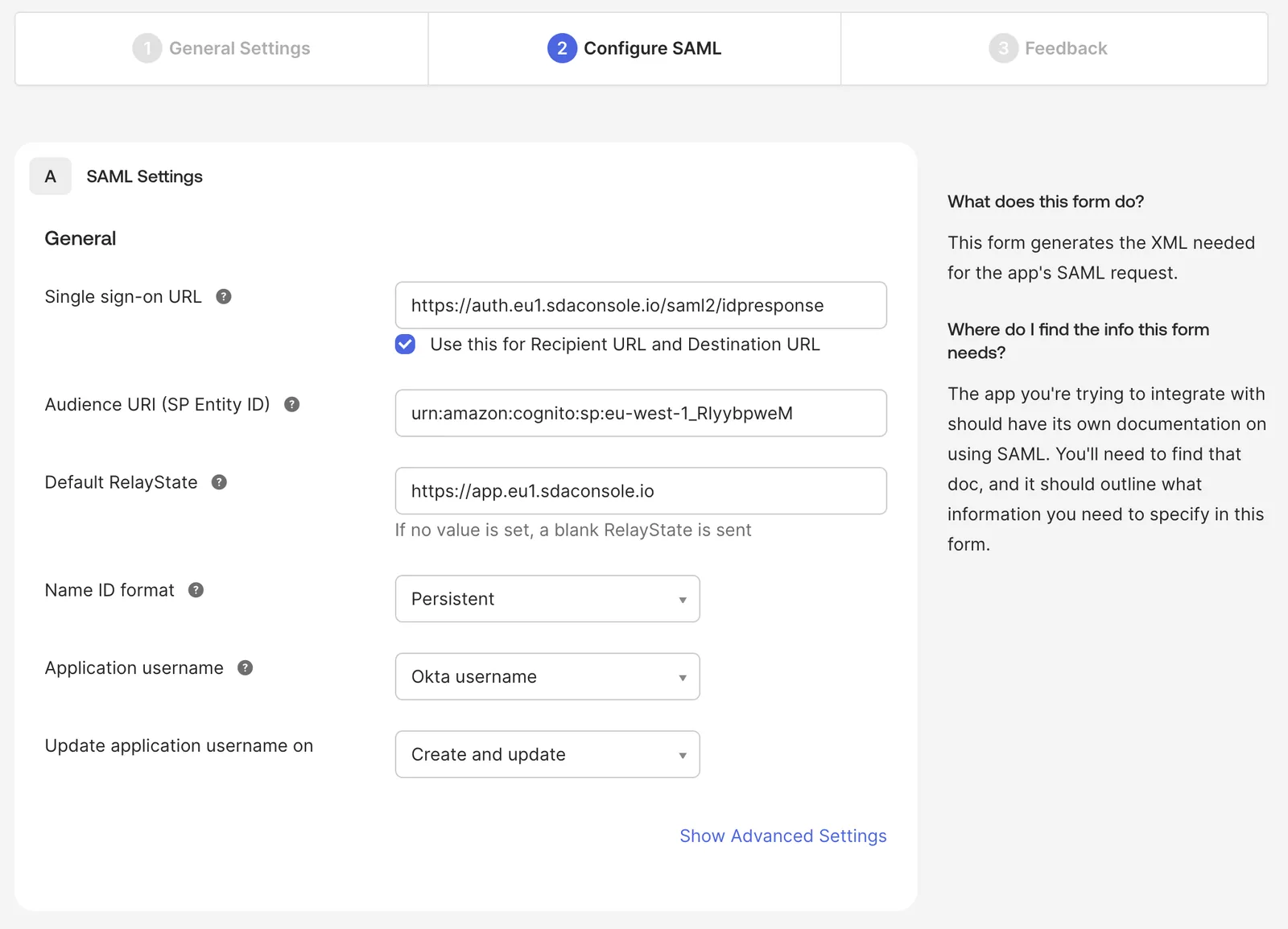
During the integration we can provide you with the signing and encryption certificates for SAML!
Required SAML Attributes
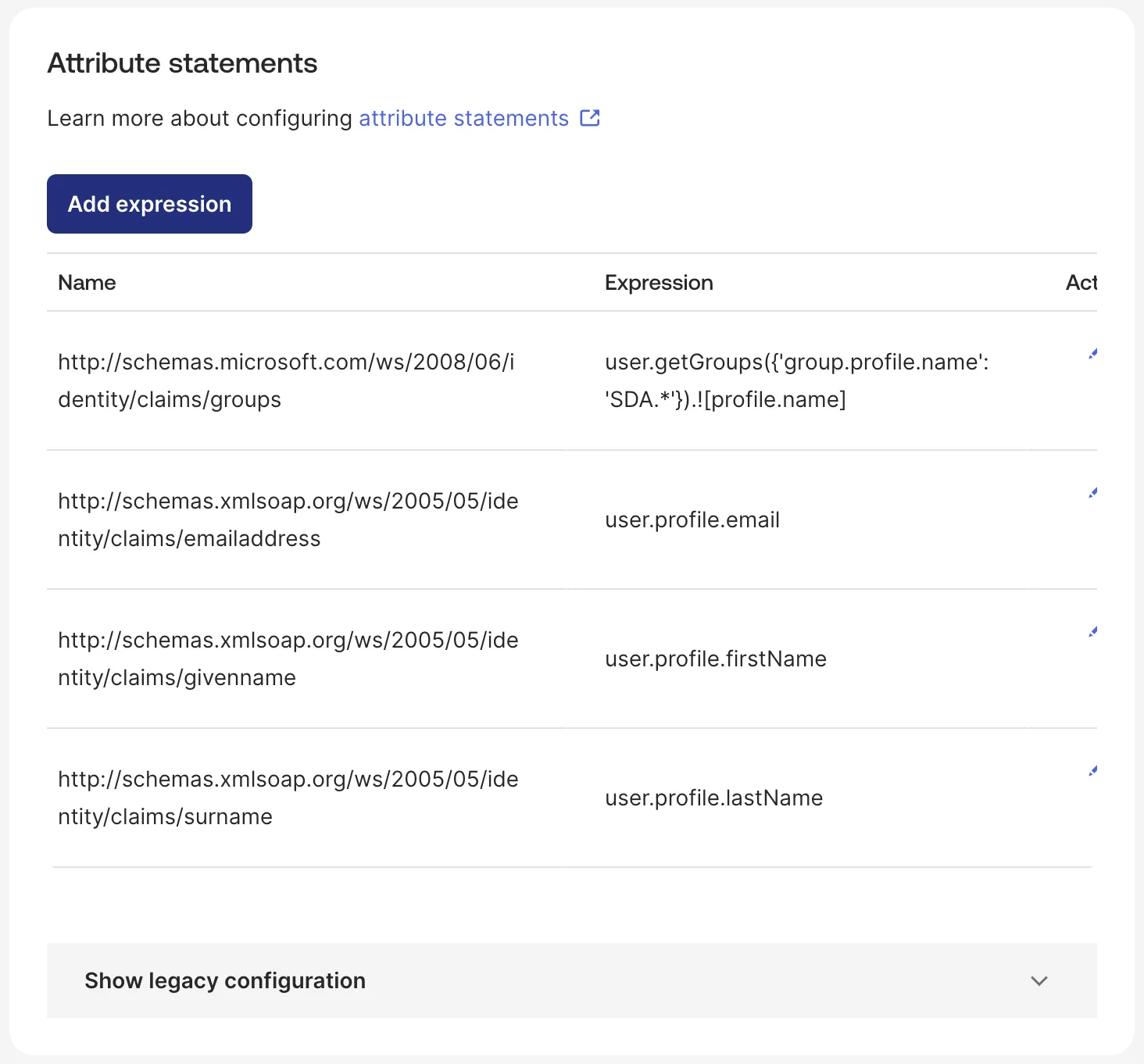
SDA requires the following SAML attributes to be configured:
| Name | Expression |
| http://schemas.microsoft.com/ws/2008/06/identity/claims/groups | user.getGroups({'group.profile.name': 'SDA.*'}).![profile.name] |
| http://schemas.xmlsoap.org/ws/2005/05/identity/claims/emailaddress | user.profile.email |
| http://schemas.xmlsoap.org/ws/2005/05/identity/claims/surname | user.profile.lastName |
| http://schemas.xmlsoap.org/ws/2005/05/identity/claims/givenname | user.profile.firstName |
Group Expression if okta groups are ending with SDA:
user.getGroups({'group.profile.name': '.*SDA'}).![profile.name]
User Groups are not mandatory if Manage Users in SDA is active for the IDP.
Single Logout
When a user signs out of SDA, SDA asks okta to end that user's okta session as well. Without the configuration below, okta ignores the request and keeps the session open, so the next person using the same browser is signed back in without being asked for credentials.
In okta, open your SDA application, then General → SAML Settings → Edit → Configure SAML → Show Advanced Settings, tick Allow application to initiate Single Logout and fill in the following:
| Parameter | Value |
| Single Logout URL | https://auth.eu1.sdaconsole.io/saml2/logout |
| SP Issuer | urn:amazon:cognito:sp:eu-west-1_RIyybpweM |
| Signature Certificate | the signing certificate provided by SDA |
The SP Issuer is a separate field from the Audience URI used for sign-in, even though both hold the same value. Sign-in can work correctly while sign-out fails because this field is empty.
To verify, sign in to SDA with SSO, sign out, then sign in again — you should be asked to authenticate with okta a second time. In okta, Reports → System Log records the attempt as User single sign out from app. If it reports Issuer does not match, the SP Issuer value does not match the one above; if it reports a signature error, the Signature Certificate is missing or incorrect.
Configuration Options
The SAML integration supports two configuration options:
1. Migrate Existing (non-SSO) Users
This option determines whether users logging in via SSO are automatically migrated to SSO authentication.
When activated:
- If a non-SSO user exists for the same email address, the user will be migrated to SSO
- Login via username/password will no longer be possible after SSO login
- All user groups are assigned from SSO-User Group mapping
2. Manage Users in SDA
This option specifies whether to manage users and user roles within SDA for this identity provider.
If a user role has an SSO mapping SSO_DEFAULT, this role is automatically assigned for new users!
When activated:
- SDA will manage users and user roles internally
- The Identity Provider (IDP) does not need to pass user groups
- Users must be created in SDA before they can login
- Except there is a
SSO_DEFAULTuser role defined!
- Except there is a
- Users must have the appropriate user roles attached
User Groups and Role Mapping
Note: If SSO is enabled for the tenant account, an SSO mapping can be applied to User Roles when editing existing roles.
When SSO is configured, user group mappings from the identity provider can be automatically applied to corresponding user roles within SDA, streamlining the user management process.